Payments by saved card details
Saved card payments let merchants charge customers without re-entering card details, using a secure card token obtained during an initial transaction.
How it works
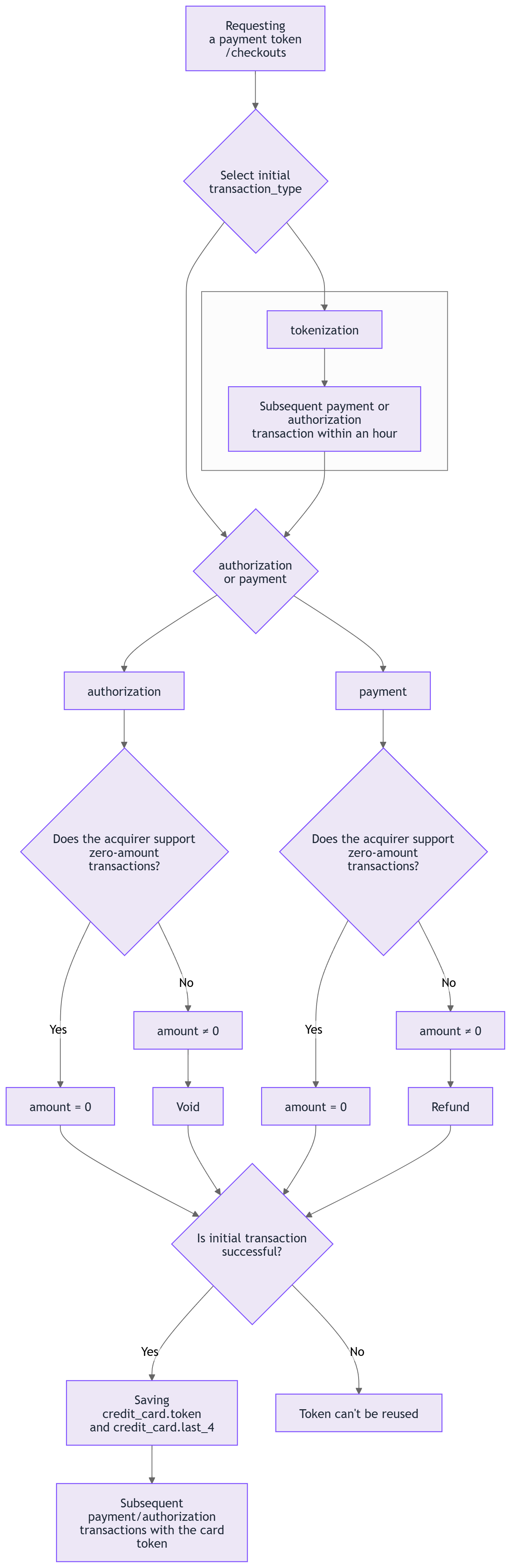
A saved card payment flow consists of the following stages:
- initial transaction when the customer submits their card details and authorizes the merchant to use them for the subsequent payments. A 3-D Secure verification may be required at this stage;
- receiving the card token in the response to the transaction or in the webhook notification and saving this token in the merchant's system;
- subsequent transaction requests using the obtained card token.
The described flow can be used for:
- recurring payments;
- on-demand payments.
Subsequent transactions can be initiated by either the merchant or the customer.
Info
If your payment scenario implies regular payments of a fixed amount, you can use the subscription service.
1) Initial transaction
To save a card for future payments, submit one of the supported transaction types and set the additional_data.contract parameter (or checkout.order.additional_data.contract for payment token requests) to ["recurring", "card_on_file"].
If your acquirer supports zero-amount transactions, the preferred option is to use the transaction of authorization type with zero amount ("amount": 0).
If zero-amount transactions are not supported by the acquirer, it is recommended to use an authorization transaction followed by a void transaction (preferred option) or a payment followed by a refund.
Alternatively, the first authorization or payment transaction may serve as the initial transaction. Ask your manager or the Tech Support Team which transaction amount you should use.
Widget integration
- Set up the payment widget on your website;
- submit a payment token request;
- specify
payment,authorizationortokenizationas the transaction_type; - if you are using
tokenizationastransaction_type, you can specify any amount in the request; - for payment and authorization, set
checkout.order.additional_data.contractto["recurring", "card_on_file"];
- specify
- use the token from the response to initialize the widget.
Payment page integration
- Submit a payment token request;
- specify
payment,authorizationortokenizationas thetransaction_type; - if you are using
tokenizationastransaction_type, you can specify any amount in the request; - for
paymentandauthorization, setcheckout.order.additional_data.contractto["recurring", "card_on_file"];
- specify
- redirect the customer to the URL from the response.
Warning
Note that when using tokenization transaction as the initial one, you need to make the subsequent transaction within 1 hour. Otherwise, the customer will be required to pass the 3-D Secure verification again.
Warning
In exceptional cases, charge request can be used as an initial one. The Tech Support Team will notify you if this transaction type is recommended for your billing model.
Example of an initial transaction: create a payment token
{
  "checkout": {
    "test": true,
    "transaction_type": "payment",
    "attempts": 3,
    "settings": {
      "return_url": "https://example.com/return",
      "notification_url": "https://example.com/notification",
      "language": "en"
    },
    "payment_method": {
      "types": [
        "credit_card"
      ]
    },
    "order": {
      "currency": "USD",
      "amount": 100,
      "description": "Test transaction",
      "tracking_id": "abc-12345",
      "additional_data": {
        "contract": [
          "recurring",
          "card_on_file"
        ]
      }
    },
    "customer": {
      "address": "Baker street 221b",
      "country": "GB",
      "city": "London",
      "email": "jake@example.com"
    }
  }
}
Example of the initial transaction when using direct requests with API for card payments
{
    "request": {
        "amount": 100,
        "currency": "USD",
        "description": "Test transaction",
        "tracking_id": "tracking_id_1",
        "language": "en",
        "credit_card": {
            "number": "4200000000000000",
            "verification_value": "123",
            "holder": "John Doe",
            "exp_month": "05",
            "exp_year": "2030"
        },
        "additional_data": {
            "contract": [
                "recurring",
                "card_on_file"
            ]
        }
    }
}
2) Saving the card token
If the transaction has been successfully completed, the card token will be sent:
- as the value of
credit_card.tokenparameter in the webhook notification; - as the value of
credit_card.tokenparameter in the synchronous response to payment, authorization or tokenization.
Save the obtained token. When receiving a token in the synchronous response, make sure that the transaction has been finalized with the successful status before saving the token.
The webhook notification and the response also include the last four digits of the customer's card provided in the credit_card.last_4 field. Use this value to display the card in the customer's saved payment methods list, typically formatted as XXXX 1234.
Example of a webhook notification with the card token
{
  "transaction": {
    "uid": "4a3365f7-b4ef-4fa7-9b21-bd552e8c8d6e",
    "status": "successful",
    "amount": 100,
    "currency": "USD",
    "description": "Test transaction",
    "type": "payment",
    "payment_method_type": "credit_card",
    "tracking_id": "abc-12345",
    "message": "Transaction is successful.",
    "test": true,
    "created_at": "2025-07-15T10:56:27.137Z",
    "updated_at": "2025-07-15T10:56:32.458Z",
    "paid_at": "2025-07-15T10:56:32.385Z",
    "expired_at": null,
    "recurring_type": "initial",
    "closed_at": null,
    "settled_at": null,
    "manually_corrected_at": null,
    "language": "en",
    "credit_card": {
      "holder": "Jake Doe",
      "stamp": "b3839d334ba40e89168d60cd9f9d1390aee3fe67dd4d5c41adbf3998043eaef8",
      "brand": "visa",
      "last_4": "0000",
      "first_1": "4",
      "bin": "420000",
      "bin_8": "42000000",
      "issuer_country": "US",
      "issuer_name": "VISA Demo Bank",
      "product": "F",
      "exp_month": 9,
      "exp_year": 2027,
      "token_provider": null,
      "token": "2a4ef31c-bdc9-450b-a979-d533a19341ac"
    },
    "receipt_url": "https://gateway.ecomcharge.com/customer/transactions/4a3365f7-b4ef-4fa7-9b21-bd552e8c8d6e/ca89173f01a8d828b90520ac06dd404031a820e1c4d3dbc1ecdb3aab7ccdf363?language=en",
    "status_code": null,
    "gateway": {
      "iframe": true
    },
    "mute_notifications": true,
    "version": 4,
    "psp_settled_at": null,
    "registry_id": null,
    "id": "4a3365f7-b4ef-4fa7-9b21-bd552e8c8d6e",
    "additional_data": {
      "contract": [
        "recurring",
        "card_on_file"
      ],
      "request_id": "50935403-5a18-4ecc-8f72-ece5a9eadf43",
      "vendor": {
        "name": "CTP",
        "token": "a0de2237fc2ba265b948073fdee6ebb8a8223cf1af951efdc09e8e369fd8efd5"
      }
    },
    "redirect_url": "https://processing.ecomcharge.com/process/4a3365f7-b4ef-4fa7-9b21-bd552e8c8d6e",
    "code": "S.0000",
    "friendly_message": "The transaction is successfully processed.",
    "smart_routing_verification": {
      "status": "successful"
    },
    "payment": {
      "auth_code": "654321",
      "bank_code": "05",
      "rrn": "999",
      "ref_id": "777888",
      "message": "Payment was approved",
      "amount": 100,
      "currency": "USD",
      "billing_descriptor": "test descriptor",
      "gateway_id": 63498,
      "status": "successful"
    },
    "avs_cvc_verification": {
      "avs_verification": {
        "result_code": "A"
      },
      "cvc_verification": {
        "result_code": "1"
      }
    },
    "customer": {
      "ip": "37.214.28.71",
      "email": "jake@example.com",
      "device_id": "5766e9d0d09e0d0c00017b1ae78982a4",
      "birth_date": null,
      "external_id": null
    },
    "billing_address": {
      "first_name": "Jake",
      "last_name": "Doe",
      "address": "Baker street 221b",
      "country": "GB",
      "city": "London",
      "zip": null,
      "state": null,
      "phone": null
    }
  }
}
3) Subsequent transactions with the card token
For subsequent transactions, use the received token as the value of credit_card.token parameter instead of submitting the card credentials. For payment token requests (widget integration), the token is sent in the checkout.payment_method.credit_card.token parameter.
Example of a payment transaction with the card token
{
    "request": {
        "amount": 100,
        "currency": "USD",
        "description": "Test transaction",
        "notification_url": "https://example.com/notification",
        "tracking_id": "3567k7",
        "language": "en",
        "test": true,
        "credit_card": {
            "token": "2a4ef31c-bdc9-450b-a979-d533a19341ac"
        }
    }
}